How it works
- Set the baselineDefine scope, tasks, milestones and dependencies.
- Plan and deliverTurn plans into work and keep progress up to date.
- Review cost and changeTrack budgets, actuals and changes in context.
- Accept and closeComplete deliverables and report on the outcome.
Built around the work
- Plans that stay connectedTasks, milestones and dependencies within projects, programs and portfolios.
- Budgets and actualsBaseline budgets, committed costs and remaining effort in view.
- Changes with contextContracts, change orders, risks and decisions on the project.
- A clear close-outDeliverables, acceptance and status reporting together.
Everything in Project management
Run every project from kick-off to close-out, with the client, contract, budget and margin always in view. Items marked Later come in a later phase.
Structure and planning
- Projects, programs and portfolios
- Tasks, milestones and deliverables
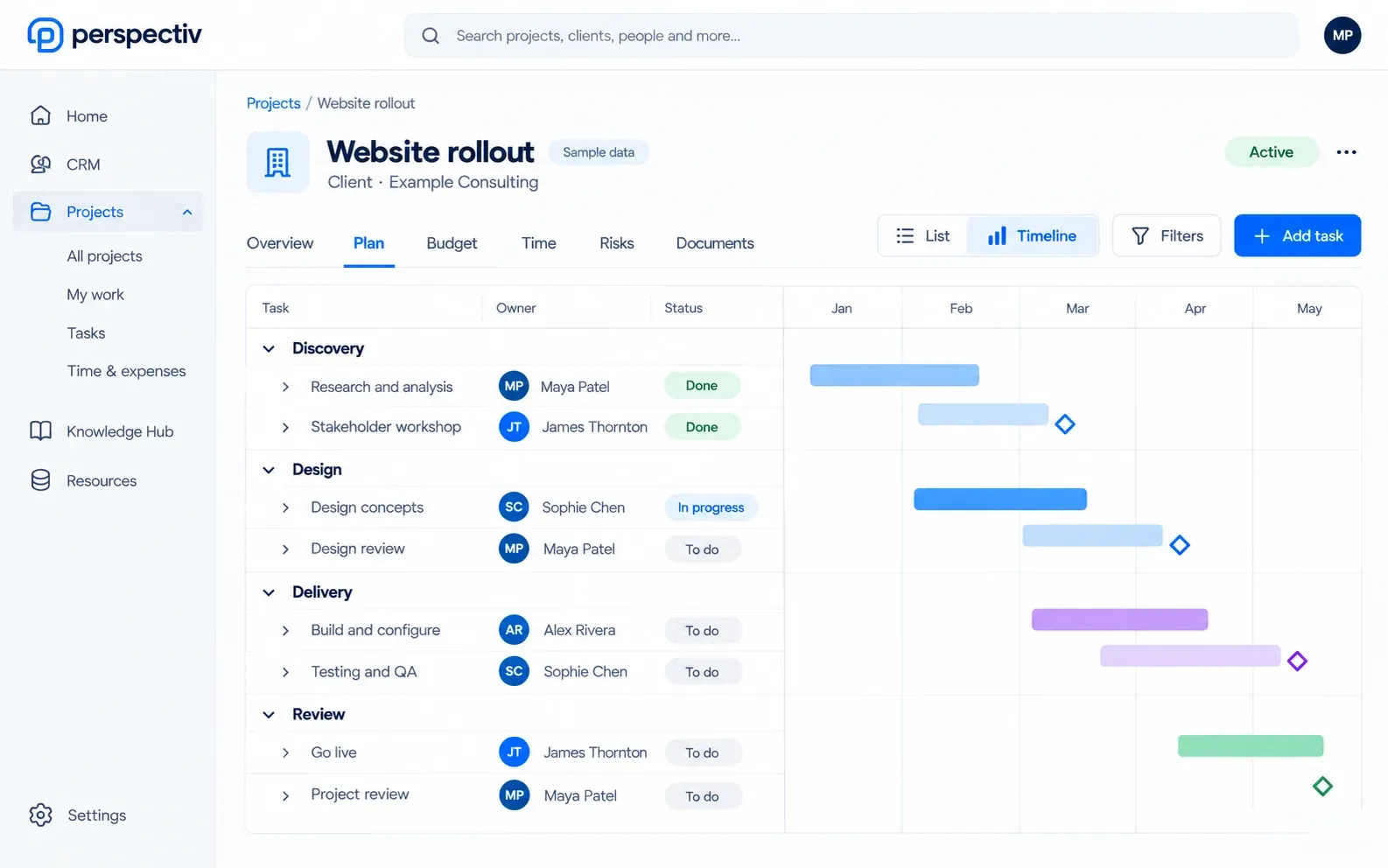
- A Gantt chart with task dependencies
- Project templates and cloning
- Progress and effort roll up automatically
Project financials
- Project budgets with baseline revisions
- Labor, subcontractor and expense costing
- Budget against actuals
- Work in progress and earned against billed revenue
- Project profitability and margin analysis
Governance
- Project contracts and statements of work
- Change orders that can amend the contract
- Risks, issues, decisions and actions
- Status reports and close-out
- Deliverables with client acceptance
Forecasting
- Estimate to complete and estimate at completion
- Revenue and profitability forecasts
- Retainer balances, consumption and rollover
- Purchase orders and subcontracts as committed cost
- Alerts when budgets or margins drift
Plans and schedules
- Work breakdown with phases and workstreams
- Tasks and subtasks with several assignees
- Estimates and remaining work per task
- Schedule variance against the baseline
- Choose which tasks accept time
- Critical path Later
- Microsoft Project import and export Later
Delivery governance
- Requirements, assumptions and constraints registers
- Quality reviews and stage gates
- Steering committees and escalations
- Meetings whose actions become tracked work
- Mark content as client-visible or internal
- Project accounting fed straight to Finance
Portfolios and commercials
- Portfolios across legal entities and currencies
- Several billing methods in one project
- Multiple bill-to parties and partner-billed work
- Billing readiness at a glance
- Azure DevOps synchronization Later
Connected across Perspectiv
Each module keeps its own availability.
At a glance
- Projects, programs and portfolios
- Work-item types and workflows you configure
- Progress and effort roll up automatically
- Project templates and cloning
- Risks, issues, decisions and actions
- Change requests and baselines
- Status reports and close-out
- Deliverables with client acceptance
- Meetings that record actions and decisions
- Dashboards you configure
Built for projects you get paid for
General task tools are good at to-do lists. Client work needs more: a baseline to compare against, change requests when the client asks for more, deliverables the client signs off, and a clear view of hours and costs against the budget.
Because projects in Perspectiv link to contracts, timesheets and invoices, the project manager sees progress and margin together.
From request to close-out
- A project request and business case are reviewed and approved
- The project is created from a template, with phases and milestones
- People are booked onto the work by skill and availability
- Time, expenses and change requests are tracked against the plan
- Deliverables are accepted, the project is closed out and invoiced
Where it lives in Perspectiv
Labels show what opens first in the private beta (Q2 2027), what is being built now, and what is on the roadmap.
- Project managementComing soon
Projects, programs and portfolios, with budgets, change orders, WIP, profitability and forecasts.
- Resource managementComing soon
Availability, scheduling, staffing, capacity, utilization and pipeline-driven demand.
- Time & expenseComing soon
Timesheets, timers and expenses against the work, approved and ready to invoice.
- Contracts (framework)Coming soon
One contracts framework for client, supplier, employee and event agreements, with renewals and e-signature.
- Reporting & analyticsPlanned
Operational and financial reports, dashboards and KPIs across every area, with drill-down to the records.
Questions
Is project management in the first beta?
Project management is coming soon. CRM and Knowledge hub are first in Q2 2027.
Is project management available now?
Project management is coming soon: it is being built now and joins the beta when it is ready.
Can we set up our own workflows?
Yes. Work-item types and workflows are configurable, and you can add your own fields and page layouts.
When can we start?
The private beta opens in Q2 2027 with Knowledge hub (intranet and published documentation) and CRM, with the framework underneath. Other modules join as they are ready.